Friday, August 20, 2010

Thing #3: Communication, Part Deux

Summer reading is more or less wrapped up for the year, so it's time to get back to writing blog entries here. I've been thinking a lot about the 23 Things, but finding the time to write down my thoughts is a whole other HUGE THING.

Enough excuses, here's my thoughts on IM and Skype.

Personal Instant Messaging Timeline

College - a DOS-ish peer-to-peer system on the local network. Limited utility, but great for distraction/gossip while working long hours on literature papers.

Grad School - AIM (meh), Yahoo Messenger (meh), Meebo (website widget good, chat meh), Skype IM (not bad), and Google Talk (ditto). The last three worked surprisingly well for project collaboration. Note taking wasn't necessary - both Meebo and Skype chat logs can be saved and accessed later. On one project, we used Google Chat and Docs for international collaboration on a paper; more efficient than many in-person projects!

Lately - Google Chat, and rarely, Facebook chat. Both ultra-simple, but I want convenience rather than features. I use them because they are there, and because I don't need to cultivate a separate list of contacts. Useful for quick chats with friends/family I 'bump into' while using either Google Mail or Facebook.
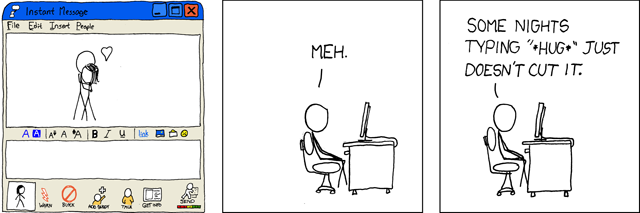
So true, but... (via xkcd)

What I like about IM in general - I'm not a phone person. At ALL. I actually had a mild phobia of making/taking phone calls up until college or thereabouts. Something about a voice with no visual clues makes me uncomfortable. Also, the natural pauses that occur in conversation seem extra-awkward on the phone.

If I can't talk to someone in person, I'd rather write to them. But sometimes email just isn't quick enough.

Also, like it or not, multitasking is the new norm. Ever try multitasking during a phone conversation? It doesn't work very well. Multitasking is much easier during an IM conversation, because you have a visual record of where you are in the exchange. Furthermore, most veteran IM'ers accept frequent pauses as a standard part of the interaction - for some reason, it feels less annoying than being put on hold.

Combine that with the potential privacy of anonymous chat, and IM seems to me like a perfect match for a busy reference environment.

Skype/Video chat, or "On screen, Mr. Worf!"

I think Skype and similar video chat services like Google Talk are, in a word, amazing. I am a life-long science fiction fan, and "videophones" are standard in almost every speculative universe. They are part of my futuristic daydreams, along with hoverboards, flying cars, and moving sidewalks. Look, there's the viewscreen now!

Oooh, shiny! (flickr photo via torley)

You don't see moving sidewalks anywhere outside of airports, and I'm still waiting impatiently for my hoverboard and flying car. But if you have an internet connection and a few pieces of inexpensive equipment, the "videophone" is a reality.

I don't have a webcam myself yet (waiting for my desktop computer to bite the dust so I can get a laptop w/ a built in), but I have used both Skype and Google Talk to chat with family members. I have a huge extended family - each of my parents has 4 siblings, plus spouses and a boatload of cousins - and while we are close and keep in touch with each other, it's hard to get all of us together in person. When Grandma can't make the trip from Phoenix to be with us at Christmas, she can still see her great-grandkids open the presents she sent.

Turns out I'm living in the future already...so I've moved my sights a bit farther up the line. NOW I can't wait 'til I can strap my videophone on my wrist à la Dick Tracy.


Thursday, June 24, 2010

Mahut and Isner and the endless tennis match.

It's STILL GOING.

Check out this gallery of photos (with hilarious captions; the reporter covering this was losing his mind) from yesterday's 7+ hours of play. Courtesy of the The Guardian.

Tuesday, June 15, 2010

RSS Feeds 2: The Remixinator

RSS feeds are great for reading. But it's also possible to use them to do interesting things! Think of the information in RSS feeds as a simple raw material - like all purpose flour.

Flour itself can be used for a few things. You can use it to clean up oily spills, as dry shampoo(?!), or to put out a grease fire. But flour plus other ingredients becomes many things, from play-doh and paste to complex sculptures:

(Flickr photo courtesy of zakwitnij)

Here are a few neat-o things you can do with a cup or two of all purpose RSS feed and a few other ingredients/appliances.

1. Put it in a pretty container.

Roy Tanck's Flickr Widget requires Flash Player 9 or better.

Get this widget at roytanck.com

This widget takes the photos in my Flickr account and displays them in a post or a sidebar. All I did was enter my own Flickr RSS feed and a few other pieces of information, and voila! It will automatically update with new photos whenever I upload them to Flickr. You can click on the floating mini-photos to see the real deal on Flickr. Cool!

2. Put it on a map.
The map below was made using an RSS feed about earthquakes (from the U.S. Geological Survey), Google Maps, and an online application called rssmapper. Rssmapper is still in beta (that's techie-speak for "has a lot of kinks to be worked out"). I tried setting up a map of UFO sightings, but it didn't work. :(

Still, this is pretty spiffy, isn't it? As new earthquake reports are published in the feed, they show up on my map. I swear, I made this map MINUTES BEFORE the earthquake up in Ontario-Quebec today - cue the Twilight Zone theme...Anyway, here it is:


3. Blend, then pick and choose what you want.
Let's say you want only news about dogs from both the New York Times and the Boston Globe. There are many tools that can help you subscribe to just the news you want from just the sources you want.

One of the most powerful of these tools is called Pipes; it's designed and maintained by Yahoo. Pipes is so powerful, it's kind of intimidating at first. There are a lot of tutorials out there to get you started, though, and you can't break anything, so why not play a bit?

I made a Pipe that does the following:
1. combines book-related RSS feeds from Salon Books, Bloomsbury, The NY Times, The Chicago Tribune, The Seattle Post-Intelligencer, and the San Francisco Chronicle
2. selects only items that contain "children", "kids", "children's", and "kid's"
3. spits out an RSS feed of those selected items

Of course, I could just subscribe to all of these feeds and then scroll, scroll, scroll to find the reviews of children's books - but that would take a long, long time. This is much faster.

It's not 100% perfect, as there are a few irrelevant (to me) items that contain those words, but it works pretty well - I'd rather get a few irrelevant items than miss the important ones. I think it could be even better if I spend more time tweaking the filter to get it just right...maybe later.

Wowiee!
So, as you can see, RSS feeds can be about much more than reading. You can remix and re-purpose them to make the Web do new things!

Mighty nifty, ain't it?
(Flicker photo courtesy of Bohman)

Friday, June 11, 2010

RSS Feeds I: The Reading

I'm excited to write a bit about RSS feeds. I have so much to say about them that I'm going to split this up into two posts. RSS Feeds 2: The Remixinator, will be forthcoming shortly.

Webcomics + RSS Reader =

I first started using an RSS reader 4 or 5 years ago, when I found webcomics. I've always loved comic strips, and am a religious reader of the funny pages. Traditional comic strips are easy to follow - they publish on a consistent schedule, sometimes for decades.

Webcomics aren't like that. Most of them are self-published, many are just for fun, and even artists who earn income from their comics frequently post on an irregular schedule. Here's a panel from one of my favorite webcomics, Natalie Dee, making light of that fact.

www.nataliedee.com

To keep up with with my new favorite webcomics, I had to visit each authors' individual website to check for updates. The longer my list grew, the harder it was to keep track of my favorite comics.

With an RSS reader, my comics automatically show up in one place whenever a new strip is published. Now, I can easily read my webcomics each morning over a bowl of cereal. I just have to be careful not to spill the milk on the keyboard!

Surely There are Better Things You Could Be Doing with This...

There sure are! I also use Google Reader to keep track of blogs for work. There are a million library blogs out there, most of which publish RSS feeds. I also use GR to follow craft blogs (for story hour and teen craft ideas), book review sites, and of course, all of my fellow 23 Things participants.

And that's only the beginning. Tune in next time for RSS Feeds 2: The Remixinator, and I'll share a little bit about how RSS feeds can be used in website development and publishing.

Friday, June 04, 2010

Dusting off the old blog, and my goals for 23 Things


(Flickr photo courtesy of wotthe7734)

It's strange to be blogging at Blogger after having spent the last few months immersed in a slightly different blogging environment. I'm glad to have a reason to do so, and I'm looking forward to working through the 23 Things along with my coworkers.

As a relatively brand-new librarian, digital native, and Internet addict, I spend a lot of time using Web 2.0 on a daily basis. I've used it for school, work and socializing. I have existing accounts on Google Docs, Twitter, YouTube, Vimeo, Flickr, Delicious, Goodreads, LibraryThing, last.fm, 43Things, Reddit, Kaboodle, etc. etc.

That sounds like a lot, but it's not really. I only use a few of those sites on any kind of regular basis, and I tend to spend most of my time reading rather than posting or commenting on other folks' content. I get a lot out of reading, but the whole point of Web 2.0 is that everyone is empowered to contribute. And I certainly don't spend much time thinking about the larger implications of what I'm doing.

I'm hoping that this project will provide the much-needed kick in the pants I need to create content, reflect on the services I already use, and explore services I don't use or have never heard of.

Why Blogger and not Wordpress? Since this blog was already set up but woefully underpopulated, it just made sense to add more content to it. Also, I think it's good to be comfortable with as many platforms and systems as one can be - even though Blogger and Wordpress are very similar, I'd like to know both of them inside and out, if only just for kicks!

This is going to be fun. I can't wait to see what my coworkers have to say about it.

Sunday, November 16, 2008

Rebirth, and a new foray into the cyberverse

Well, this blog has certainly languished. Fast-forward a few years, and I'm now done with library school and seeking work! In retrospect, it was silly of me to think that I'd have much energy left over to blog while working and taking a full load of courses. Now that the degree is complete, however, I'm ready to make use of this outlet again.

I also decided that it was time to do what everyone else was doing in 1990-mumble, and create a personal outpost on the web. Not a social networking profile, not a one-time school assignment, but my own domain, attached to my own name. I'd registered the domains a few years ago, but never got around to putting anything up. It was time to get hosting.

I'd heard good things about HostGator, and was happy with both their pricing plans and their offering of cPanel (a content management interface I'd used before and liked). It was fast and easy to get my account set up, and happily they offered a PayPal option (which I also liked). After a bit of confusion about how to set up a domain that is registered elsewhere, I was off and running.

So far I am still happy with HostGator, although if you check out the site you'll see I'm not asking much of them yet. My one quibble is with the HTML editor they offer, which is giving me fits. Either it doesn't play well with Firefox, or I am doing something wrong - I'm getting consistent hang when previewing, a basic function that should work flawlessly. The editor also doesn't create particularly clean HTML. Yes, I could code this all by hand, but it would likely take weeks.

Happily, I've found that Nvu (a now-defunct but still useful stand-alone WYSIWIG editor) serves my purpose at the moment. It works more predictably and more quickly than the web-hosted editor provided by HostGator. I haven't started exploring the CSS or other higher level tools yet, but in terms of basic text and image layout, it has been far easier to work with. And to my eye, the resulting HTML has been somewhat cleaner. I'll definitely be watching for the successor to Nvu (whatever it might be).

Sunday, September 24, 2006

Cataloging - First Assignment Submitted, and Thesauri Discussion

I did an analysis of an online discussion forum that I belong to (eGullet.com). I think it went alright, but index analysis is harder than I expected! I think it’s because when an index is well-designed, you don’t really have to think about it – you just use it. It’s quite difficult (for me) to break it down into its working parts, especially with an online index where some of the working parts are combined (ex. locators that also contain their own inherent data). It’s even harder to talk about these components in an organized way – I would set out to talk about one aspect of the index, and end up talking about others as well – they go hand in hand, and it’s almost impossible to talk about one without mentioning others.

It was an interesting exercise, though, especially critiquing the index and talking about how it DOESN’T work well. Really got my mind going on how this particular index could be improved (which I imagine was one of the main points of the assignment).

This past class session, we talked thesauri (which are more-or-less vocabulary indices). THAT was interesting. After showing us the nuts and bolts of thesauri and their notation, the professor had us try to develop a small one for chocolate. It quickly became clear that a thesaurus is not just an index of specialized vocab, but can represent an entire conceptual framework. We talked some more about how preferred terms and hierarchical relationships can become so important, especially when you are creating a thesaurus about culture or religion. I really had no idea. It’s amazing.

There are some crazy-cool thesauri available online too. Here are some she showed us.

Art and Architecture Thesaurus

Maths Thesaurus (this one still has a few glitches)

Visual Thesaurus

That last one is a heck of a lot of fun to play with, but it’s a for-profit product so you only get a limited trial. Still, pretty neat!


Saturday, September 16, 2006

First session of the interdisciplinary seminar class

It’s been quite a long time since I’ve had to sit through an entire day of classes. The first all-day session of this class really tested my learning stamina, or more specifically, my listening stamina. The lectures were a mix of congratulatory fluff (“we’re the greatest information school in the country, or should be!”), which I could have done without, and really great content on the history of communication technology. I have to confess that I was nearly brain-dead by the end…

...which was a perfect time for us to meet our small group members and work on our technology problem exercise and subsequent presentation (she said, sarcastically)!

To be honest, this work session went much better than I expected. As far as gender and cultural divides go, they seemed to have little effect. The striking differences showed up in expertise and language use. Our conversations took a lot of time because the Information Management folk have a very structured vocabulary for project work, which they threw around with great speed, and the rest of us (me especially) had to ask for clarification quite a lot. Thankfully, despite these language barriers (hardly the ones I expected!), I think we designed a decent project and will probably have a halfway decent presentation to do.

I was surprised at how I feel less intimidated all the time. There are so many smart, smart people in all of the programs, but I never realized how many presentation and communication skills I have developed over the past few years. I suppose I assumed that everyone can do this effectively – not true! (At least, they can’t yet – I couldn’t always, either.) And a good deal of project management skill also rubbed off on me inadvertently.

It’s nice to be surprised by your own competence!

Wednesday, September 13, 2006

Youth services: who are we willing to serve?

I have been mulling over my career options (it's a constant thing with me, really), and I keep coming back to youth services in a public library setting. There are many reasons for this. First, I genuinely enjoy young people. They energize me. Second, while I loved school myself, I just can't see myself working in a school setting for any length of time. I'm not sure why, but school media specialist work is not for me. Third, I'm convinced that it's vitally important work. Not just because the library was hugely important to me as a young person, but because I'm learning already that libraries (like most public organizations) are in the fight of their lives to prove their relevance and ensure their longevity. It seems to me that reaching out to young people is crucial because they will be the library users of the future - and if they don't use the library now, will they ever?

With that in mind, I started poking around for blogs by youth services librarians, and found a wonderful post that juxtaposes the issues of youth librarianship with social work issues (general human service is important to me, too). In her post entitled Youth in libraries - are you really ready to welcome them in? , Librarian Deb asks some hard-hitting questions of youth services librarians. We say that all teens are welcome, and that we are interested in promoting literacy - but what if we do a good job with this, and the result is that youth with "undesirable" behaviors frequent our youth library spaces? How far does our committment to youth literacy go? What are we willing to tolerate, and what is not tolerable? How do we serve both underpriviledged individuals and the so-called "good kids", and make them both feel comfortable in the youth library space?

I would say that I want to find a way to welcome anyone, but the logistics of this are difficult. As Deb states, it might require partnership with social workers, teen outreach workers, who knows who else. This type of teen library is really appealing to me - it's the logical extension of a public library that's already serving as a meeting place for various community groups, a place that's already doing adult and emerging literacy work, etc. However, the issue of making 2 groups of teens (those who already frequent the library, and those who don't yet do so) comfortable in one space is a very, very tricky one. I'm not sure how it could be achieved, but if one were successful with it, the possibilities for community transformation seem quite rich.

Friday, September 01, 2006

Social Networking: It Benefits Us All

I promise that I'll write a more serious and thorough post about social networking sites and their connection to library science someday soon.

However, I just had a library-related "eureka!" moment thanks to 43 Things, a site with which I've been involved for about a year or so. Although 43 Things has connections to Amazon.com, which is off-putting to some (I guess they fear that their lives will be used as market research material?), I find that there are a wide range of individuals using the site. The MySpace-Xanga-LiveJournal set definitely does, and older folks seem to like it, too. I think the goal-oriented flavor of 43 Things makes it appealing to many different people.

Now, my amazing discovery: it's not so much an amazing discovery as it is a fun and unexpected benefit from someone else's goals and hard work. I ran across an entry by an individual who remembered an educational series called Tomes and Talismans that was created in 1986 to teach children the basics of library and research skills. This series really made an impact on me when it was shown to me in the school library during 2nd or 3rd grade - the concepts are presented in the course of a science fiction drama about censorship or loss of knowledge resources (I think) and the preservation/rediscovery of knowledge. Pretty far out for children's educational television! I think that it definitely contributed to my life-long interests in science fiction, dystopian societies in fiction, and censorship issues, and it probably taught me some things about using the library, too.

Anyhow, this 43 Things member knew not only the title of the series (which I have been trying to remember for years), but he or she also did the legwork to discover that I might be able to obtain my own copy of the whole series for about 50 bucks. I think I may have to invest in this series once all of my loan money comes through. $50 is not much to pay to have access to such a formative part of my childhood. Amazing that this should turn up now; I'm just beginning my library degree, and suddenly I am connected with the (most-likely) low-budget television series that may have started the whole thing.

For those who might be interested: according to the 43 Things member, here is how to get ahold of your own copy of Tomes and Talismans.

Send a statement requesting a copy, and a check or money order for $48.00 to:

Mississippi Public Broadcasting
Attn: Millard O'Baner
3825 Ridgewood Rd.
Jackson, MS 39211

Enjoy!

Wednesday, August 30, 2006

Introducing...Mademoiselle Librarian!

So, after an unfortunate accidental deletion of my original blog (remember, kids, always back up dilligently!), I'm back in the saddle again.

I'll repeat my initial post (now long gone) by saying that I have two intentions for this blog. First, I hope it will serve as a semi-informal record of my studies as a Master's student in the Library Science program at Syracuse University's School of Information Studies. Second, I will use it to share interesting library resources, tips, tricks, news, concepts, what have you, with the general public as I come across them. This is assuming that the general public has any interest at all in this sort of thing, which is assuming a lot.

I have only had two class sessions so far, and thus am not very far into my studies at this point. I am taking three 3-credit courses this sememster (the "gateway" course, i.e. "the parade of professionals"; the cataloging course; and the reference course), as well as a 1-credit weekend seminar on information and information environments.

This weekend course will be taken jointly with students in the other Master's degree programs in the School of Information Studies. The other two programs are Information Management and Information Management and Telecommunications - much more technical than my program of study. The interesting thing is that while the enrollment in these programs is overwhelmingly male and overwhelmingly East Indian and Asian in ethnicity, the Library Science program is largely female and Caucasian. Very stereotypical if you think about it, in both cases. I am making no judgements at all about this state of affairs, but I'm curious about the implications for the weekend course, and whether cultural and gender differences will come into play.

So far, I am feeling very optimistic about this program and wholly confident in my choice to come here (this could change when I begin paying back the loans in 2 years). The instructors I have met up to this point are both articulate and personable, as are many of the students. A great deal of the course content is in an online format - this will require a bit of adjustment for me, although I am quite Web-savvy by now. In fact, it's an adjustment for everyone involved, as the interface we are using (WebCT 6.0) is a brand-new version for instructors and students alike this semester. There are still some bugs to be worked out. Overall, though, I am intrigued by the possibilities of online instruction, and pleased that the online format will allow me access to other electives I might not otherwise be able to take.